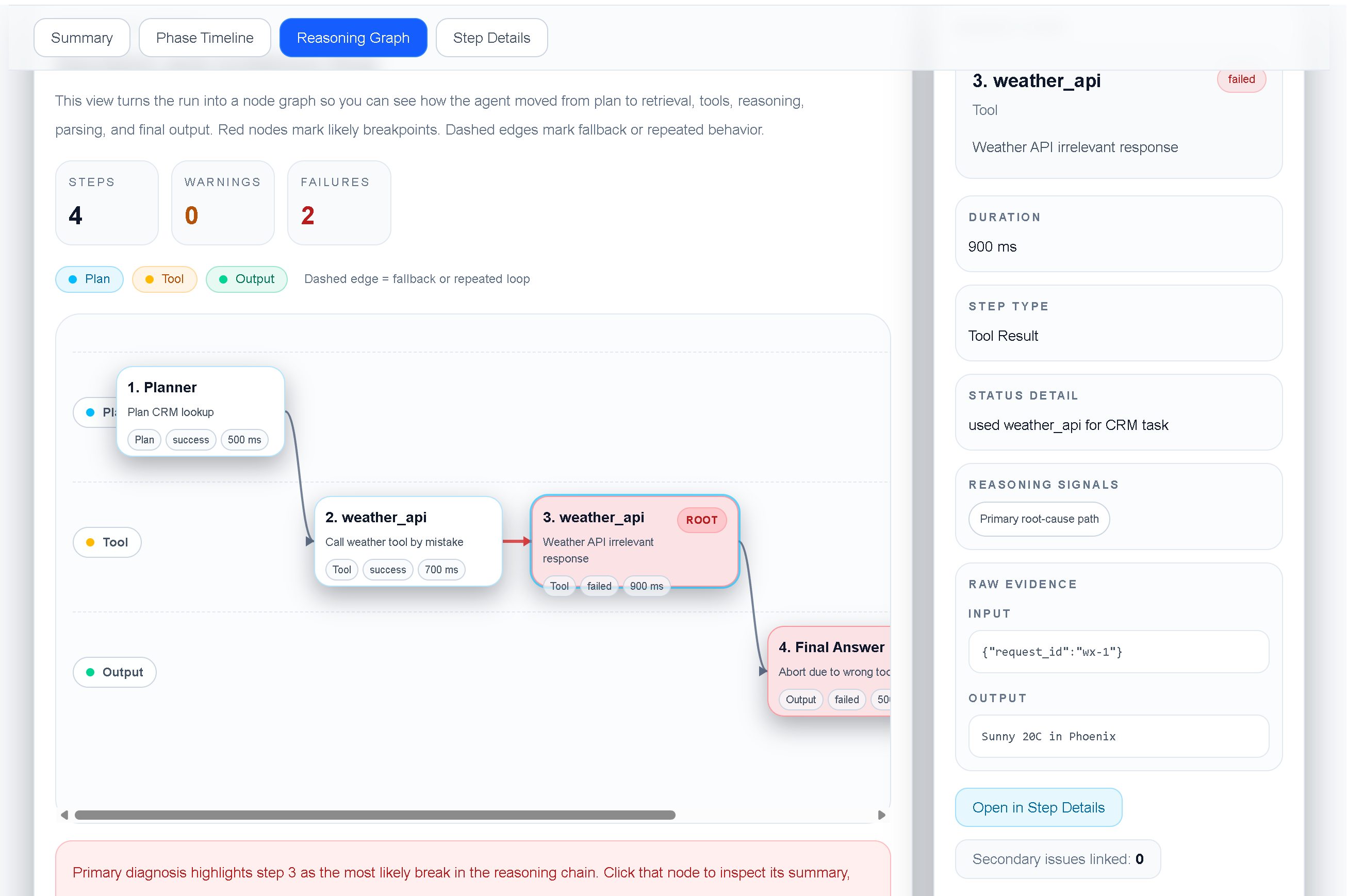
When an AI agent calls the wrong tool, the final error is often less useful than the first incorrect decision. A trace lets you follow the agent from its plan through tool selection, arguments, responses, and the final failure.
This tutorial uses a small failed run to show a repeatable debugging workflow for LLM and agent developers.
In this example, the agent was asked to check the CRM owner for Acme Corp. It planned a CRM lookup, but then selected weather_api. The tool returned an irrelevant result, and the run ended without answering the original task.
The trace contains 4 steps, including 2 failed step(s). The important question is not only “where did the run fail?” but “where did the execution first diverge from the task?”
1. **Start with the task input.** Confirm what the agent was supposed to accomplish.
2. **Inspect the planner or reasoning step.** Check whether the intended tool and constraints were identified.
3. **Compare the selected tool with the plan.** A mismatch is often the earliest actionable defect.
4. **Inspect tool arguments and results.** Irrelevant results can hide the original selection error.
5. **Follow the failure to the final answer.** Confirm whether the agent recovered, degraded gracefully, or stopped.
TraceProbe keeps the run in one local view so you can inspect the summary, phase timeline, execution details, and reasoning graph without reconstructing the sequence from scattered logs.
For this failure, useful safeguards include:
Keep the failed trace as a deterministic fixture. A good regression test should assert that the agent selects the CRM tool for this request, that the arguments match the CRM schema, and that an irrelevant weather response cannot be accepted as task evidence.
The fastest way to debug an agent is to identify the first wrong decision, not just the last visible error. A structured trace makes that decision inspectable and gives the team a concrete regression case to prevent it from returning.